<?xml version="1.0" encoding="utf-8"?><feed xmlns="http://www.w3.org/2005/Atom" ><generator uri="https://jekyllrb.com/" version="4.4.1">Jekyll</generator><link href="/feed.xml" rel="self" type="application/atom+xml" /><link href="/" rel="alternate" type="text/html" /><updated>2026-04-05T15:07:39+03:00</updated><id>/feed.xml</id><title type="html">Dev &amp;amp; Apps</title><subtitle>C# software &amp; apps development. It will appear in your document head meta (for Google search results) and in your feed.xml site description.</subtitle><entry><title type="html">Raytracer Implementation In C#</title><link href="/csharp/raytracer/2026/04/05/raytracer-implementation-csharp.html" rel="alternate" type="text/html" title="Raytracer Implementation In C#" /><published>2026-04-05T10:37:20+03:00</published><updated>2026-04-05T10:37:20+03:00</updated><id>/csharp/raytracer/2026/04/05/raytracer-implementation-csharp</id><content type="html" xml:base="/csharp/raytracer/2026/04/05/raytracer-implementation-csharp.html"><![CDATA[<p>Here is the c sharp project implementation of my decade-old Raytracer:</p>

<h3 id="raytracer-implementation-in-c-sharp"><a href="https://github.com/danmunteanu/RAYTRACER_UNILIGHT">Raytracer Implementation In C-Sharp</a></h3>

<p>My License Thesis at the Computer Science University was a custom-made Raytracer.</p>

<p>I wrote it in Java. Now Java is not the best choice for writing a Raytracer, to be honest.</p>

<p>I should’ve chosen C or C++ at the time, but that’s what my past self decided to go with.</p>

<p>Anyway, the code was much easier to port to C# this time, as all the primitives and raytracing engine were already there.</p>

<p>[RAYTRACER PIC]</p>

<p>I think it looks neat. While it does look simple - you can render only a few spheres and change their color and material properties.</p>

<p> </p>]]></content><author><name></name></author><category term="csharp" /><category term="raytracer" /><summary type="html"><![CDATA[Here is the c sharp project implementation of my decade-old Raytracer:]]></summary></entry><entry><title type="html">Drawing Fractals In C#</title><link href="/csharp/fractals/2026/01/11/fractal-drawing-app-csharp.html" rel="alternate" type="text/html" title="Drawing Fractals In C#" /><published>2026-01-11T15:37:20+02:00</published><updated>2026-01-11T15:37:20+02:00</updated><id>/csharp/fractals/2026/01/11/fractal-drawing-app-csharp</id><content type="html" xml:base="/csharp/fractals/2026/01/11/fractal-drawing-app-csharp.html"><![CDATA[<h2 id="what-are-fractals">What are fractals?</h2>

<p>Fractals are special geometrical shapes created through <strong>iteration</strong>.</p>

<p>You take a simple starting rule and apply it over and over again.</p>

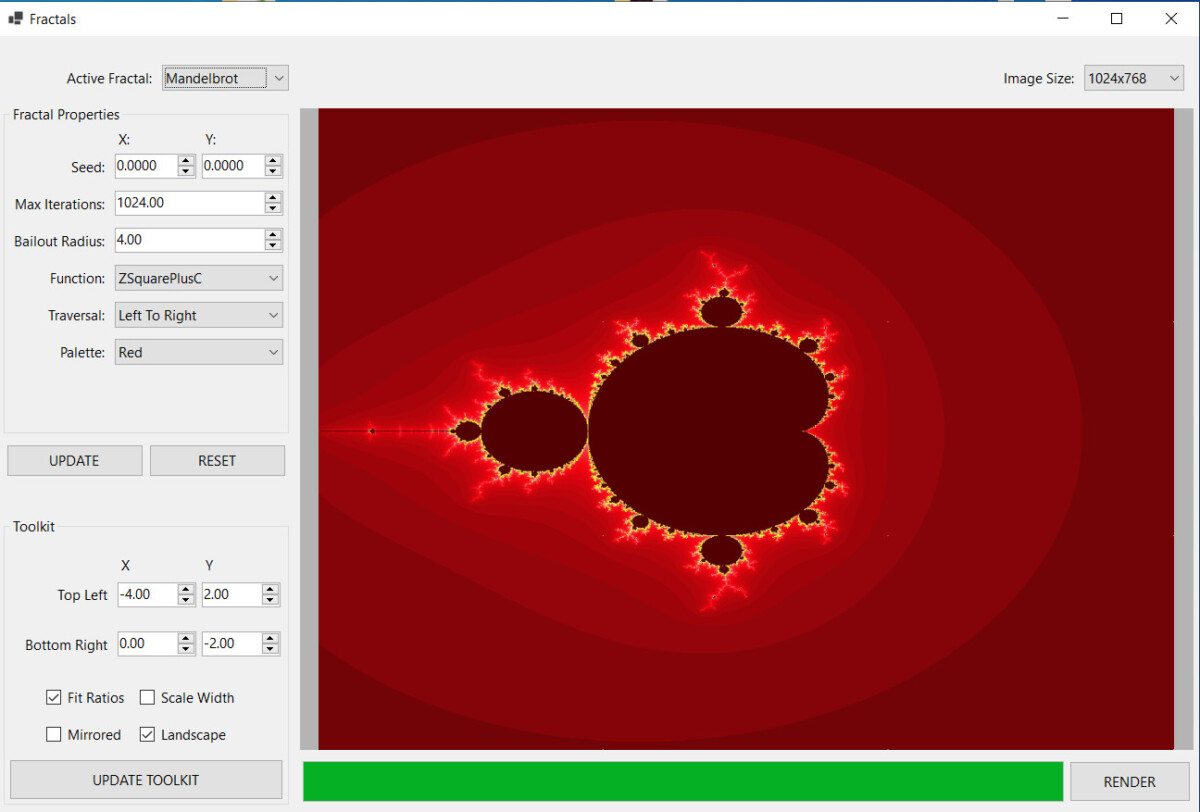
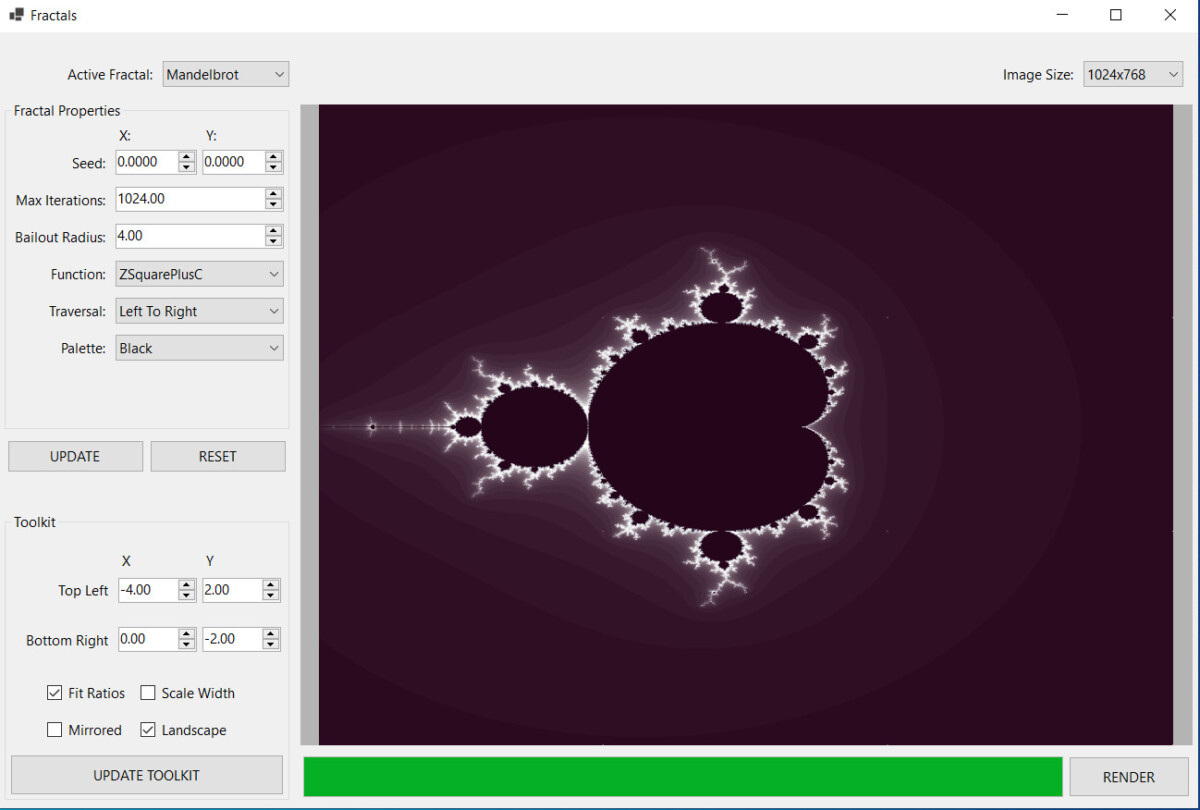
<p>One of the most famous fractals is <strong>the Mandelbrot set</strong>.</p>

<p>Here it is in action:</p>

<p><img src="/assets/images/2026-04-03_fractals_app/fracs_1.jpg" alt="Image" /></p>

<p><img src="/assets/images/2026-04-03_fractals_app/fracs_4.jpg" alt="Image" /></p>

<p>Beautiful and mysterious, isn’t it?</p>

<p>If you’re looking to build your own implementation, have a look at the <a href="https://github.com/danmunteanu/CS_GRAPHICS">windows forms app to draw fractals</a> I built.</p>

<p>Use it as a starting point or inspiration, feel free to use or mis-use the code.</p>

<p>There are other fractal types, such as</p>

<h3 id="kochs-snowflake">Koch’s snowflake</h3>

<h3 id="sierpinskys-carpet">Sierpinsky’s carpet</h3>

<h3 id="julia-sets">Julia Sets</h3>

<p>The Julia set is derived from the Mandelbrot fractal.</p>

<p>Back in 2009, I’d already implemented a fractal painter for Symbian S60, as a simple exercise. But it was incredibly slow, running on old hardware with no graphical acceleration.</p>

<h2 id="the-2d-transform-toolkit">The 2D Transform Toolkit</h2>

<p>What I was really proud of though, was the Toolkit I’d developed. It was capable of transforming 2D coordinates from screen (application) space to 2D space (that’s where fractals live).</p>

<p>It was doing this using 2D transformation matrices.</p>

<p>I’d written my own Matrix2D and Complex classes to handle geometrical transformations in 2D space.</p>

<p>With the proper setup, this toolkit was capable of transforming every point from screen space to 2D coordinates.</p>

<p>Screen space (where pixels live) and the 2D world are two separate universes.</p>

<p>Fractals or any other geometrical objects live in 2D space. They have real coordinates and obey mathematical rules. They can be shrunk, grown, rotated, or moved up or down any axis.</p>

<p>But you need coordinates for that, both negative and positive, on both the X and the Y axes, respectively.</p>

<p>Objects in screen space have coordinates that go between 0 and the width of the screen (or drawing buffer). You can’t do much with an object limited between 0 and 640 pixels.</p>

<p>In 2D space, you’re free to do whatever you want with mathematical entities living there.</p>

<p>That’s why we need a way to transform pixels to and from the two worlds. And that’s what the Toolkit does.</p>

<h2 id="porting-challenges">Porting Challenges</h2>

<p>Here are the challenges I had with the App:</p>
<ul>
  <li>porting the C++ Symbian S60 code to C#</li>
  <li>implementing a parallel rendering algorithm I could re-use in other projects</li>
  <li>rendering multiple unrelated fractal types, besides the Mandelbrot set.</li>
  <li>implementing a dynamic properties editor</li>
</ul>

<p>I wanted a base class so I could render multiple fractals dynamically.</p>

<p>I wanted a fractal editor for every type of fractal.</p>

<p>Now the biggest challenge with the fractal painter was parallel rendering.</p>

<p>Since I’d already implemented the algorithm 15 years ago, I thought I’d speed up things and use ChatGPT to speed up the translation from C++ to C#. While I do use AI, I also like to take ownership of the code it gives, to “make it mine”.</p>

<p><em>TBD: Link to CS_GRAPHICS instead</em></p>

<p>Now, at the time of the writing, a few issues remain:</p>
<ul>
  <li>not all fractal types are implemented</li>
  <li>progress bar does not work yet</li>
  <li>updating the world view coordinates does not work</li>
  <li>would be nice to have a zoom-in function</li>
  <li>rendering takes a bit too long, even with multi-threading</li>
  <li>the application remains unresponsive while rendering the fractal</li>
</ul>

<p>The best part is that I’ve put the rendering algorithm in a separate class so that I could re-use it for…</p>]]></content><author><name></name></author><category term="csharp" /><category term="fractals" /><summary type="html"><![CDATA[What are fractals?]]></summary></entry><entry><title type="html">Visual Studio 2022 Designer’s Problem With Generic Classes In C#</title><link href="/csharp/visualstudio/2025/03/28/visual-studio-designer-generic-classes-csharp-problem.html" rel="alternate" type="text/html" title="Visual Studio 2022 Designer’s Problem With Generic Classes In C#" /><published>2025-03-28T15:37:20+02:00</published><updated>2025-03-28T15:37:20+02:00</updated><id>/csharp/visualstudio/2025/03/28/visual-studio-designer-generic-classes-csharp-problem</id><content type="html" xml:base="/csharp/visualstudio/2025/03/28/visual-studio-designer-generic-classes-csharp-problem.html"><![CDATA[<p>Working on a WinForms project yesterday (MemphisSharp), I’ve encountered a weird, albeit well-known Visual Studio Designer problem.</p>

<p>I wanted to re-use the DialogSelectTransform component from COMMON_FORMS.</p>

<p>I’m already successfully using in another projects and it works perfectly.</p>

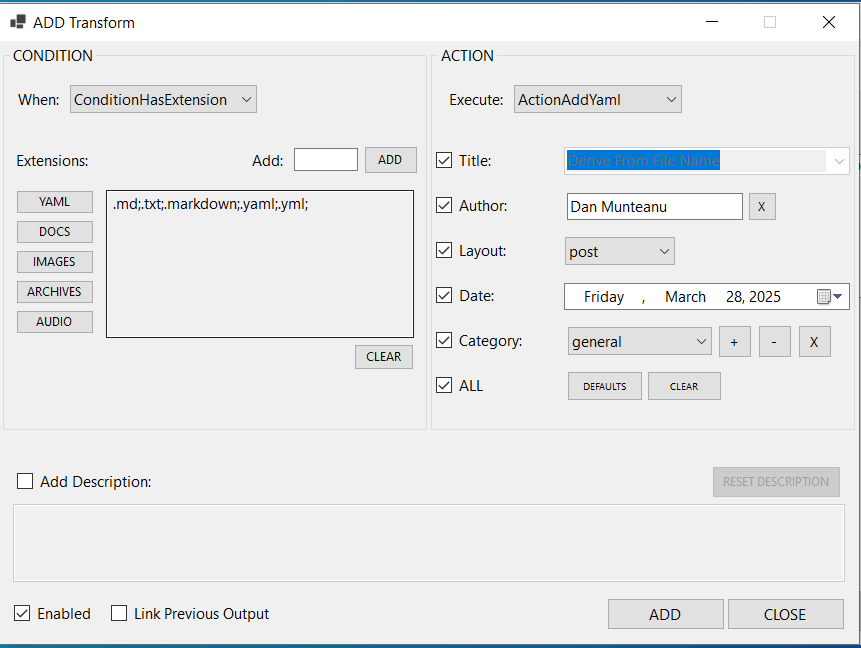
<p>Here it is in action.</p>

<p><img src="/assets/images/2025-03-28_visual_studio_designer_c_sharp_problem/dialog_select_transform.png" alt="Image" /></p>

<p>On the left, you configure a condition, (e.g. ConditionHasExtension).</p>

<p>And on the right, you select an action to apply when the condition is met. (e.g. ActionAddYaml to add yaml front-matter data to your files).</p>

<p>This dialog should be re-usable.</p>

<p>And I thought it was.</p>

<p>But, when I wanted to use it with a different set of Transforms, compilation failed.</p>

<p>Why?</p>

<p>Well, in MASS_YAML, I’m adding and editing string transforms - Transform&lt;string&gt;.</p>

<p>And in MEMPHIS_SHARP, I wanted to edit Transform&lt;Token&gt;.</p>

<p>The actual class is generic - Transform&lt;T&gt;</p>

<p>So, I made the dialog class generic:</p>

<p><em>public partial class DialogSelectTransform&lt;T&gt; : Form</em></p>

<p>Simple, no?</p>

<p>Wrong:</p>

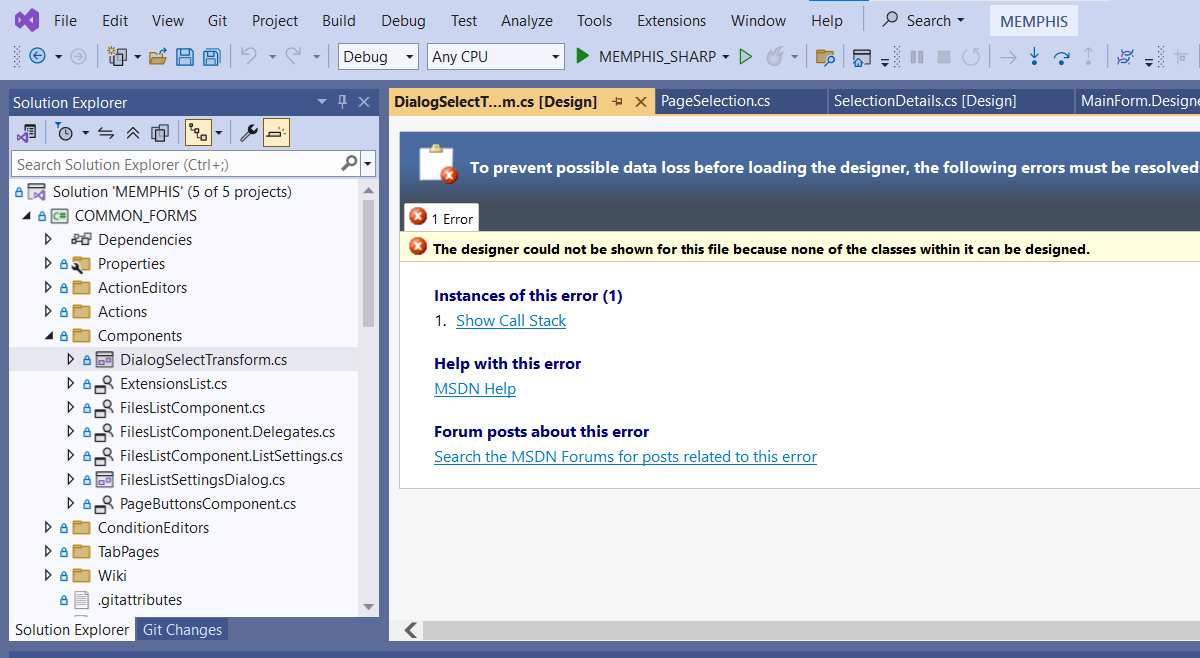
<p><img src="/assets/images/2025-03-28_visual_studio_designer_c_sharp_problem/visual_studio_designer_generic_class.png" alt="Image" /></p>

<p>Turns out, the Designer can’t edit generic classes, even if they inherit Form or UserControl.</p>

<p>Bummer.</p>

<p>Now what?</p>

<p>Well, ChatGPT suggested I create a concrete class DialogSelectTransform&lt;string&gt; which inherits from the generic base class DialogSelectTransform&lt;T&gt;.</p>

<p>And that should work.</p>

<p>No, it didn’t. Bad GPT!</p>

<p>Although ChatGPT insisted it should, confidently.</p>

<p>But when I questioned it, it admitted he was wrong.</p>

<p>The approach wouldn’t work. I wonder who feeds it with data, honestly.</p>

<p>And if you question it, it says “you are right, it won’t work”.</p>

<p>Anyways, I can use the dialog with Transform&lt;Token&gt;</p>

<p>But I can’t edit it anymore.</p>

<p>So, I have to find a solution that allows me to still edit the dialog and keep the generic aspect of it.</p>

<p>Honestly, I’m up for the challenge!</p>

<p>Until next time.</p>

<p><em>Later edit: </em>Apparently, if I remove the generic &lt;T&gt; argument from both DialogSelectTransform.cs and DialogSelectTransform.Designer.cs, the form will load and will be editable. And when I’m done, I just have to add the &lt;T&gt;’s back. Huh.</p>]]></content><author><name></name></author><category term="csharp" /><category term="visualstudio" /><summary type="html"><![CDATA[Working on a WinForms project yesterday (MemphisSharp), I’ve encountered a weird, albeit well-known Visual Studio Designer problem.]]></summary></entry><entry><title type="html">Generic Factory In C#</title><link href="/csharp/design-patterns/2025/03/25/generic-factory-c-sharp.html" rel="alternate" type="text/html" title="Generic Factory In C#" /><published>2025-03-25T15:37:20+02:00</published><updated>2025-03-25T15:37:20+02:00</updated><id>/csharp/design-patterns/2025/03/25/generic-factory-c-sharp</id><content type="html" xml:base="/csharp/design-patterns/2025/03/25/generic-factory-c-sharp.html"><![CDATA[<h2 id="the-common-base-class-problem">The common base class problem</h2>
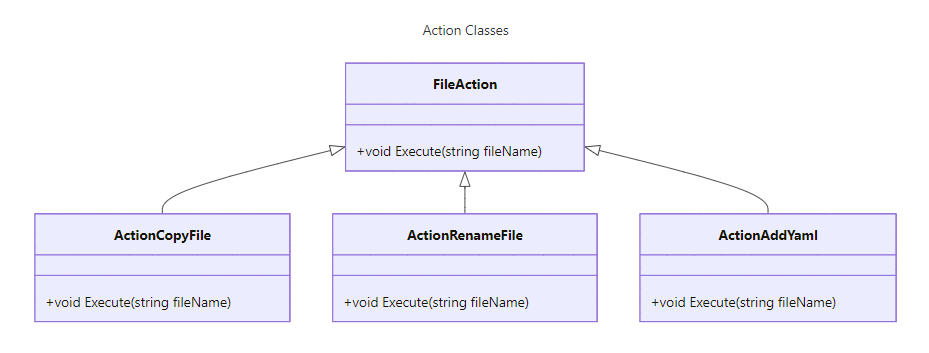
<p>In one of my projects, I have a class hierarchy sharing a common base class - <strong>Action</strong>&lt;string&gt;.</p>

<p>For simplicity, we’ll name it <strong>FileAction</strong> in the diagram below.</p>

<p>Multiple classes inherit and extend the base class:</p>

<p><img src="/assets/images/2025-03-25-generic-factory-c-sharp/class-hierarchies-action-classes.png" alt="Image" /></p>

<p>There are more classes in the hierarchy. Additionally, any app using the class hierarchy can add their own Action implementation as needed.</p>

<p>I want to automate the creation of derived classes instances’, based on string identifier.</p>

<p>Also, I want any app using the class hierarchy to use the solution out of the box.</p>

<p>Something like</p>

<p>Action = Solution.Create (“ActionCopyFile”);</p>

<p>So, what’s the solution?</p>

<p>It’s a design pattern named The Factory Method.</p>

<p> </p>
<h2 id="declaring-a-generic-c-factory">Declaring A Generic C# Factory</h2>
<p>The GenericFactory class will have:</p>
<ul>
  <li>one generic argument <strong>TBase</strong> (the base class of the hierarchy)</li>
  <li>a <strong>dictionary</strong> to store associations between a string ID and a Creator method (mCreators)</li>
  <li>a <strong>register method</strong> to associate an ID with a Creator (Register)</li>
  <li>a <strong>create method</strong> to call the Creator associated with an ID (Create)</li>
</ul>

<p>This way, we can use the generic factory with multiple class hierarchies.</p>

<p>A Creator is a delegate that will match any method returning a class instance derived from TBase.</p>

<p>We’re also making all class members and methods static.</p>

<p>This way, you won’t have instantiate the factory class every time you want to use it.</p>

<p> </p>
<h2 id="the-register-method">The Register Method</h2>
<p>Simply adds a new entry to the dictionary.</p>

<p>Some additional checks are required before adding the pair:</p>
<ul>
  <li>prevent an empty ID</li>
  <li>prevent and empty creator</li>
  <li>prevent duplicate entries</li>
</ul>

<figure class="highlight"><pre><code class="language-csharp" data-lang="csharp"><span class="c1">//  Registers a creator delegate by id</span>
<span class="k">public</span> <span class="k">static</span> <span class="k">void</span> <span class="nf">Register</span><span class="p">(</span><span class="kt">string</span> <span class="n">id</span><span class="p">,</span> <span class="n">Creator</span> <span class="n">creator</span><span class="p">)</span>
<span class="p">{</span>
    <span class="c1">//  TBD: Localize the exception messages</span>
    <span class="k">const</span> <span class="kt">string</span> <span class="n">KMsgNullId</span> <span class="p">=</span> <span class="s">"ID cannot be null or empty."</span><span class="p">;</span>
    <span class="k">const</span> <span class="kt">string</span> <span class="n">KErrDelegateNull</span> <span class="p">=</span> <span class="s">"The creator delegate cannot be null."</span><span class="p">;</span>
    <span class="k">const</span> <span class="kt">string</span> <span class="n">KErrCreatorAlreadyRegistered</span> <span class="p">=</span> <span class="s">"There is a creator already registered with ID {0}"</span><span class="p">;</span>

    <span class="k">if</span> <span class="p">(</span><span class="kt">string</span><span class="p">.</span><span class="nf">IsNullOrWhiteSpace</span><span class="p">(</span><span class="n">id</span><span class="p">))</span>
        <span class="k">throw</span> <span class="k">new</span> <span class="nf">ArgumentException</span><span class="p">(</span><span class="n">KMsgNullId</span><span class="p">,</span> <span class="k">nameof</span><span class="p">(</span><span class="n">id</span><span class="p">));</span>
    
    <span class="k">if</span> <span class="p">(</span><span class="n">creator</span> <span class="p">==</span> <span class="k">null</span><span class="p">)</span>
        <span class="k">throw</span> <span class="k">new</span> <span class="nf">ArgumentNullException</span><span class="p">(</span><span class="k">nameof</span><span class="p">(</span><span class="n">creator</span><span class="p">),</span> <span class="n">KErrDelegateNull</span><span class="p">);</span>

    <span class="k">if</span> <span class="p">(!</span><span class="n">mCreators</span><span class="p">.</span><span class="nf">TryAdd</span><span class="p">(</span><span class="n">id</span><span class="p">,</span> <span class="n">creator</span><span class="p">))</span>
        <span class="k">throw</span> <span class="k">new</span> <span class="nf">InvalidOperationException</span><span class="p">(</span><span class="kt">string</span><span class="p">.</span><span class="nf">Format</span><span class="p">(</span><span class="n">KErrCreatorAlreadyRegistered</span><span class="p">,</span> <span class="n">id</span><span class="p">));</span>
<span class="p">}</span></code></pre></figure>

<p>Using the method looks something like</p>

<figure class="highlight"><pre><code class="language-csharp" data-lang="csharp"><span class="n">GenericFactory</span><span class="p">&lt;</span><span class="kt">string</span><span class="p">&gt;.</span><span class="nf">Register</span><span class="p">(</span><span class="s">"actionCopy"</span><span class="p">,</span> <span class="p">()</span> <span class="p">=&gt;</span> <span class="k">new</span> <span class="nf">ActionCopyFile</span><span class="p">());</span></code></pre></figure>

<p>I’ve used a lamba expression as the 2nd argument to simply create a new instance of the ActionCopyFile;</p>

<p>But it can be any other method that matches the Creator delegate signature.</p>

<p> </p>
<h2 id="the-create-method-call">The Create Method Call</h2>

<p>This method is responsible with finding and invoking the creator associated with and ID.</p>

<p>If no creator was found, an exception is thrown.</p>

<figure class="highlight"><pre><code class="language-csharp" data-lang="csharp"><span class="c1">//  Calls the associated creator for the specified ID</span>
<span class="k">public</span> <span class="k">static</span> <span class="n">TBase</span> <span class="nf">Create</span><span class="p">(</span><span class="kt">string</span> <span class="n">id</span><span class="p">)</span>
<span class="p">{</span>
    <span class="k">if</span> <span class="p">(</span><span class="n">mCreators</span><span class="p">.</span><span class="nf">TryGetValue</span><span class="p">(</span><span class="n">id</span><span class="p">,</span> <span class="k">out</span> <span class="kt">var</span> <span class="n">creator</span><span class="p">))</span>
        <span class="k">return</span> <span class="nf">creator</span><span class="p">();</span>
		
    <span class="k">throw</span> <span class="k">new</span> <span class="nf">KeyNotFoundException</span><span class="p">(</span><span class="s">$"There is no creator registered with the ID \"</span><span class="p">{</span><span class="n">id</span><span class="p">}</span><span class="s">\"."</span><span class="p">);</span>
<span class="p">}</span></code></pre></figure>

<p> </p>
<h2 id="better-readability-with-global-usings">Better readability with global usings</h2>
<p>If I want to use the generic factory and pass it a generic argument of RealityFrameworks.Actions.Action<string>, I have to write:</string></p>

<figure class="highlight"><pre><code class="language-csharp" data-lang="csharp"><span class="n">RealityFrameworks</span><span class="p">.</span><span class="n">GenericFactory</span><span class="p">&lt;</span><span class="n">RealityFrameworks</span><span class="p">.</span><span class="n">Actions</span><span class="p">.</span><span class="n">Action</span><span class="p">&lt;</span><span class="kt">string</span><span class="p">&gt;</span> <span class="p">&gt;;</span></code></pre></figure>

<p>There has to be an easier way than this!</p>

<p>Enter global usings.</p>

<p>I’ve created a GlobalUsings.cs file and added it to the project.</p>

<p>Inside it, I’ve put aliases:</p>

<figure class="highlight"><pre><code class="language-csharp" data-lang="csharp"><span class="c1">// GlobalUsings.cs</span>
<span class="k">global</span> <span class="k">using</span> <span class="nn">FileCondition</span> <span class="p">=</span> <span class="n">RealityFrameworks</span><span class="p">.</span><span class="n">Conditions</span><span class="p">.</span><span class="n">Condition</span><span class="p">&lt;</span><span class="kt">string</span><span class="p">&gt;;</span>
<span class="k">global</span> <span class="k">using</span> <span class="nn">FileAction</span> <span class="p">=</span> <span class="n">RealityFrameworks</span><span class="p">.</span><span class="n">Actions</span><span class="p">.</span><span class="n">Action</span><span class="p">&lt;</span><span class="kt">string</span><span class="p">&gt;;</span>

<span class="k">global</span> <span class="k">using</span> <span class="nn">FileTransform</span> <span class="p">=</span> <span class="n">RealityFrameworks</span><span class="p">.</span><span class="n">Transform</span><span class="p">&lt;</span><span class="kt">string</span><span class="p">&gt;;</span>

<span class="k">global</span> <span class="k">using</span> <span class="nn">FileConditionFactory</span> <span class="p">=</span> <span class="n">RealityFrameworks</span><span class="p">.</span><span class="n">GenericFactory</span><span class="p">&lt;</span><span class="n">RealityFrameworks</span><span class="p">.</span><span class="n">Conditions</span><span class="p">.</span><span class="n">Condition</span><span class="p">&lt;</span><span class="kt">string</span><span class="p">&gt;&gt;;</span>
<span class="k">global</span> <span class="k">using</span> <span class="nn">FileActionFactory</span> <span class="p">=</span> <span class="n">RealityFrameworks</span><span class="p">.</span><span class="n">GenericFactory</span><span class="p">&lt;</span><span class="n">RealityFrameworks</span><span class="p">.</span><span class="n">Actions</span><span class="p">.</span><span class="n">Action</span><span class="p">&lt;</span><span class="kt">string</span><span class="p">&gt;&gt;;</span>

<span class="k">global</span> <span class="k">using</span> <span class="nn">EditorFactory</span> <span class="p">=</span> <span class="n">RealityFrameworks</span><span class="p">.</span><span class="n">GenericFactory</span><span class="p">&lt;</span><span class="n">CommonForms</span><span class="p">.</span><span class="n">EditorBase</span><span class="p">&gt;;</span></code></pre></figure>

<p>It looks better and much faster to use, don’t you agree?</p>

<p>I’m much happier with the shorthand notation, thank you very much.</p>

<p>The only fallback? The aliases are visible only within the current assembly.</p>

<p>If I want to use those aliases in a different assembly, I must define them again, in their own GlobalUsings.cs file.</p>

<p> </p>
<h2 id="registering-multiple-creators">Registering multiple creators</h2>
<p>In my main app, I’ve created a method to register all creators and calling it once, in the constructor of the main windows form.</p>

<figure class="highlight"><pre><code class="language-csharp" data-lang="csharp"><span class="k">private</span> <span class="k">void</span> <span class="nf">RegisterCreators</span><span class="p">()</span>
<span class="p">{</span>
	<span class="c1">//  REGISTER ACTION Creators from RealityFrameworks assembly</span>
	<span class="n">FileActionFactory</span><span class="p">.</span><span class="nf">Register</span><span class="p">(</span><span class="k">typeof</span><span class="p">(</span><span class="n">ActionCopyFile</span><span class="p">).</span><span class="n">Name</span><span class="p">,</span> <span class="p">()</span> <span class="p">=&gt;</span> <span class="k">new</span> <span class="nf">ActionCopyFile</span><span class="p">(</span><span class="n">Path</span><span class="p">.</span><span class="nf">GetTempPath</span><span class="p">()));</span>
	<span class="n">FileActionFactory</span><span class="p">.</span><span class="nf">Register</span><span class="p">(</span><span class="k">typeof</span><span class="p">(</span><span class="n">ActionAppendToFile</span><span class="p">).</span><span class="n">Name</span><span class="p">,</span> <span class="p">()</span> <span class="p">=&gt;</span> <span class="k">new</span> <span class="nf">ActionAppendToFile</span><span class="p">());</span>
	<span class="n">FileActionFactory</span><span class="p">.</span><span class="nf">Register</span><span class="p">(</span><span class="k">typeof</span><span class="p">(</span><span class="n">ActionRenameFile</span><span class="p">).</span><span class="n">Name</span><span class="p">,</span> <span class="p">()</span> <span class="p">=&gt;</span> <span class="k">new</span> <span class="nf">ActionRenameFile</span><span class="p">());</span>
	<span class="n">FileActionFactory</span><span class="p">.</span><span class="nf">Register</span><span class="p">(</span><span class="k">typeof</span><span class="p">(</span><span class="n">ActionGroup</span><span class="p">&lt;</span><span class="kt">string</span><span class="p">&gt;).</span><span class="n">Name</span><span class="p">,</span> <span class="p">()</span> <span class="p">=&gt;</span> <span class="k">new</span> <span class="n">ActionGroup</span><span class="p">&lt;</span><span class="kt">string</span><span class="p">&gt;());</span>
<span class="p">}</span></code></pre></figure>

<h2 id="using-the-create-method">Using the Create method</h2>
<p>And this is how you use the Create method with a generic factory.</p>

<figure class="highlight"><pre><code class="language-csharp" data-lang="csharp"><span class="kt">string</span> <span class="n">actionId</span> <span class="p">=</span> <span class="k">typeof</span><span class="p">(</span><span class="n">ActionCopyFile</span><span class="p">).</span><span class="n">Name</span><span class="p">;</span>	<span class="c1">//	or any other valid action ID</span>
<span class="kt">var</span> <span class="n">action</span> <span class="p">=</span> <span class="n">FileActionFactory</span><span class="p">.</span><span class="nf">Create</span><span class="p">(</span><span class="n">actionId</span><span class="p">);</span></code></pre></figure>

<p>Simply pass a string identifier to the Create method of the factory.</p>

<h2 id="full-source-code">Full Source Code</h2>
<p>Download the full generic factory code <a href="/assets/source/GenericFactory.cs">here</a>.</p>]]></content><author><name></name></author><category term="csharp" /><category term="design-patterns" /><summary type="html"><![CDATA[The common base class problem In one of my projects, I have a class hierarchy sharing a common base class - Action&lt;string&gt;.]]></summary></entry></feed>